1.)
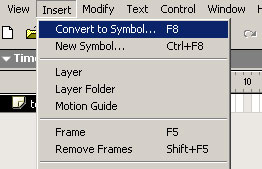
Click the arm of your character. Goto Insert
> Convert to Symbol.
----------------------- -----------------------
2.)
Now choose Movie Clip, and name your characters symbol
arm. Click ok. Then insert
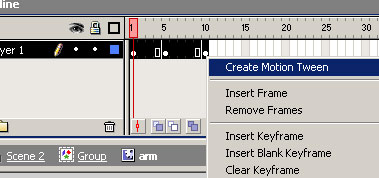
keyframe on 5 and 10 then select all the frames, right click and Create Motion Tween.
----------------------- -----------------------
3.)
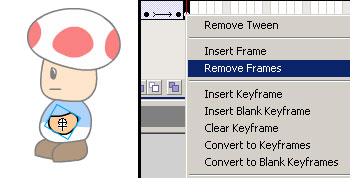
On frame 5, move your arm and rotate it a bit, just
like I did above (the left pic). Here is where it gets
a little tricky, but its how I do it. Now on frame 9
Insert Keyframe, then on frame 10 Remove
Frame (the right pic).
-----------------------
-----------------------
4.)
Publish your animation and now you got a character moving
his/her arm and if you did the last lesson you have
him/her blinking as well. Next lesson you will learn
how to make your character walk!