1.)
First off make an object of anykind, I made a circle/oval.
I made mine in the first frame of layer 1. Select all
of the object and make it a symbol by either hitting F8
or
Insert>Convert To Symbol. (Note: You can
name your layers, doesn't have to be layer 1, layer 2
and so on.)
--------------
--------------
2.)
Now on frame 10 (or whatever) Insert>Keyframe (F6).
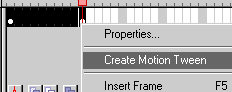
Then highlight frames 1 through 10 and right click. Select
Create Motion Tween
--------
--------------
3.)
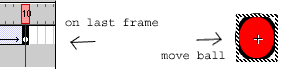
On the last frame of the tween. Move the ball wherever
you want it to move to. Its that easy. And Walla, you
just made a motion tween.
--------------
--------------
4.)
Next is just to publish it (File>Publish), then
you get a .SWF. Shown above.